

How to use Makeit
by Makeit_official
Makeit is your workshop in your pocket — plan a build, follow it step by step, then share or sell what you made. This quick walkthrough shows you the whole loop in a few minutes: get inspired, find a guide, make it your own project, create with M-studio, and share or earn.
A smartphone
Makeit runs on Android and iPhone.
A PC or laptop
OptionalPrefer a big screen? Open makeitapp.io in your browser — it’s the full app on the web.
Step 1 of 6
Get inspired in the Feed
EXPLORE THE FEED
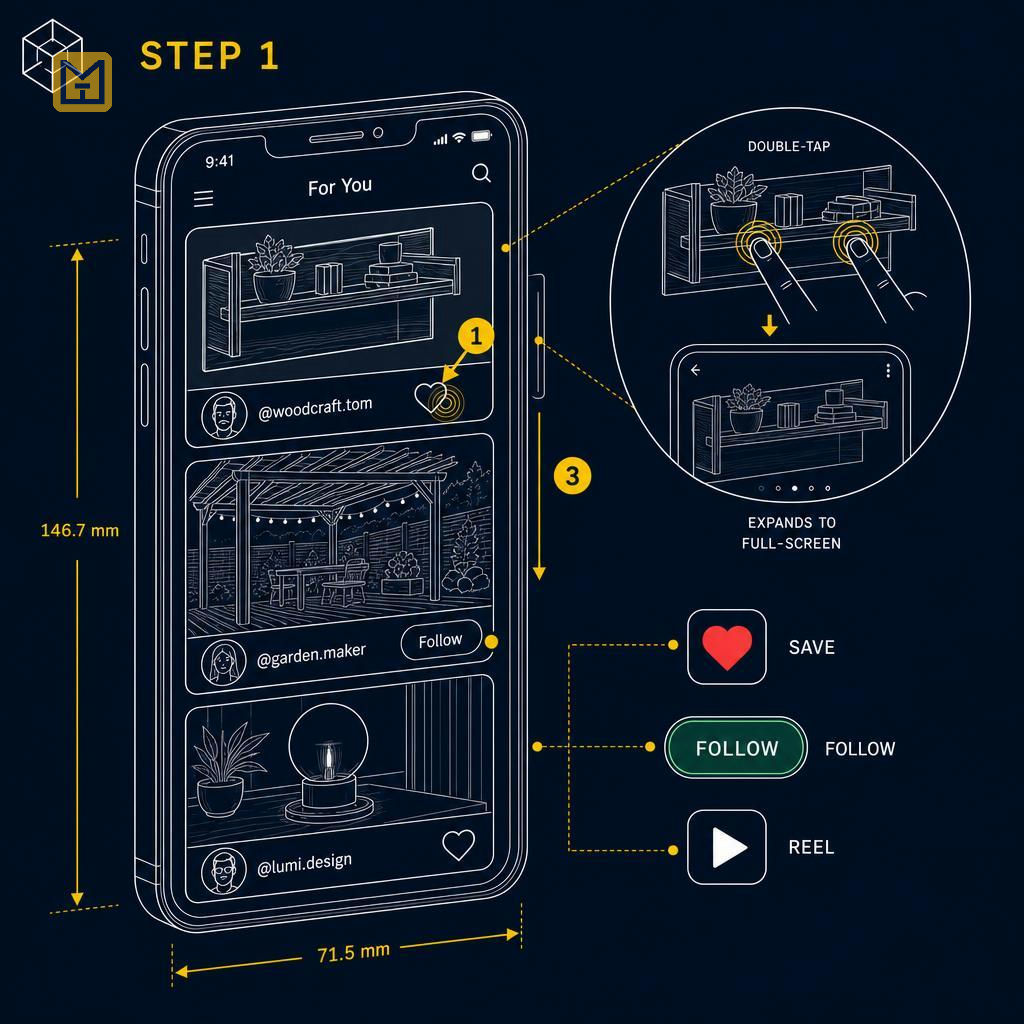
- ✓Double-tap photo to open full-screen
- ✓Tap heart to save favourite projects
- ✓Follow makers for more inspiration
Instructions
Open the Feed to see what the community is building right now — real photos, short reels and finished results. It's the fastest way to catch ideas before you start. Double-tap a photo to open it full-screen, tap the heart to save the ones you love, and follow the makers whose work you want more of. When something sparks an idea, you're ready for the next step.
Swipe or use ← → keys
Want to follow this guide step by step or log your own build?
Open in the Makeit App